11 min read
100 founder spots, one week in: what changed in pkgr since they opened
A build-in-public report on pkgr since the founder spots opened: what shipped, what each change fixes, what is still missing, and what is next.
I wrote a sentence in public a week into the founder offer: the first founders’ feedback “already changed my roadmap”. A sentence like that should be checkable. So I went through my git history from mid-September to today, commit by commit, and matched each change to the reason behind it.
This post is the result. It is a progress report, not a launch announcement. It has what shipped, what each change was meant to fix, what is still missing, and what I plan to do next. Where I cannot prove something from the repository, I say so in the text instead of rounding it into something nicer.
The promise I made at launch
The offer is simple. There are 100 founder spots. You pay USD 149 once and get lifetime access to the Starter plan. After the 100 spots, Starter goes monthly, at USD 9 a month at the time of writing. If you have not triggered a single build by December 31, 2026, you are refunded automatically.
Behind the price sits a more important promise: you push code to GitHub, and pkgr builds, signs and ships it. No Xcode to install, no Mac to maintain. The pitch I keep repeating is Code, Build, Package, Deploy, all in the cloud.
A promise like that is cheap to write and expensive to keep. Going from “I can produce a signed binary” to “a stranger can ship an app to the store without calling me” is a long road. Founders are the first strangers. I said I wanted to build pkgr with users, not in an echo chamber, and this was the first test of it.
What the git history says
The repository has 66 commits between September 15 and October 10. Most of them are not interesting to read: formatting, test fixes, illustrations. The ones that matter group into a clear shape, shown below.
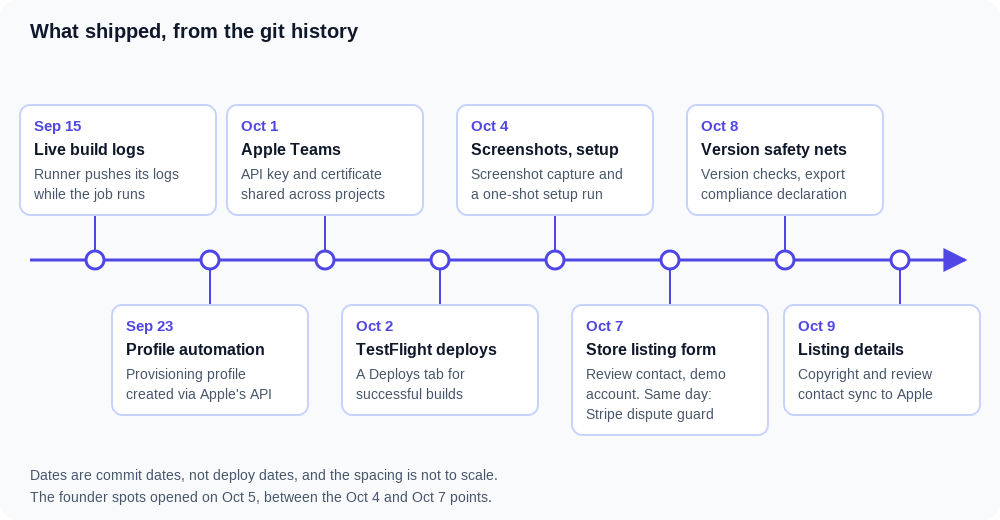
Two caveats on this timeline. Dates are commit dates, not deploy dates, and several commits are large, so one date can cover days of work.
The next four sections group these changes into themes. For each one I describe the friction as the code shows it, then what I changed. Where a founder asked for the change, I say so.
Theme 1: seeing the build instead of waiting for it
The friction is easy to feel. You push, a macOS runner starts somewhere, and for several minutes you stare at a status that says “running”. When it fails, you find out at the end, and the reason sits in a log you have to hunt for on GitHub.
On September 15 I added a way for the runner to push its logs to pkgr while the job is still running. The workflow starts a small log shipper with a run token, and the dashboard shows the log with timestamps and highlighted errors. The same commit is where the build page gets its log viewer. I kept going in the same direction afterwards: clearer error messages for an invalid App Store Connect key on October 5, and explicit messages when file storage is unavailable on October 7. Slightly earlier, on September 10, an expired-session handler started sending you to the login screen instead of leaving a page that silently stops working.
None of this is glamorous. All of it answers the same question: when something goes wrong, can the person in front of the screen understand it without writing to me?
This theme started with a request from a founder. I do not quote them, but the changes above are my answer to it.
Theme 2: signing, without the Apple portal tab
Code signing is where most people give up on doing iOS without a Mac. pkgr already generated the distribution certificate through the App Store Connect API before the founder wave. What changed in the past few weeks is how much of the rest I took off your plate, and how I organised it.
On September 23 I added provisioning profile generation: pkgr asks Apple’s API for the profile instead of sending you to the developer portal to click through it. Then, on October 1, I changed the ownership model. Until then, the App Store Connect API key was stored per project. The code now says why that was wrong: the key belongs to your Apple Developer account, not to one app, and Apple limits an account to 50 active API keys. The certificate had the same problem in a sharper form, since Apple usually allows only three active distribution certificates per account. Generating one per project would burn through that limit fast.
So both the key and the certificate now live on an “Apple Developer Team” that every project of yours shares. If you already have a certificate made in Keychain, you can upload it by hand. The trade-off is documented in the code: a manually uploaded certificate has no Apple identifier I can use, so automatic profile generation is switched off for it. On October 4 I also added a one-shot setup workflow that writes the pkgr workflow into your repository, behind a confirmation step, because a button that commits to someone’s repo should never act without asking.
If you want the longer engineering story behind these choices, I wrote it in what I learned automating iOS code signing.
This theme also started with a founder request: they found signing and the Apple side of the process too complicated. Everything above exists to remove that step from their day.
Theme 3: the last mile to the store
This is the biggest block of work, and the commit log makes the logic visible. A signed build on your phone is not a released app. Between the two sits TestFlight, then a store page, then review, and each has its own way of saying no.
On October 2 the Deploys tab arrived: a successful production build can be sent to TestFlight and App Store Connect, with a status that follows Apple’s processing. From October 4 to 9 I built the store page around it: description, keywords, release notes, review contact, a demo account for Apple’s reviewers, category and pricing, and finally copyright. When Apple already has texts for a version, pkgr loads them instead of showing an empty form, and it never overwrites what you typed.
Screenshots took the longest. pkgr loads your web build in a headless browser, in a separate workflow, and captures the pages at the exact sizes Apple accepts. A capture that does not match one of Apple’s listed sizes is rejected on my side, rather than by Apple long after. You can push the result to App Store Connect, or delete it. One limit to state plainly: this captures your web app, so it fits JavaScript apps wrapped for iOS, which is what pkgr targets today.
Then came the numbers. Apple refuses an upload whose build number is not higher than the last one it received, and it says so only at the end of the job, after a macOS runner has already started. On October 8 I made each build take its number from the GitHub run number, made the marketing version optional, and added a check against App Store Connect before the deploy starts. If your version is not higher than the published one, you get the answer immediately. If Apple cannot be reached, the check steps aside and the job tries the upload, because a safety net should not become a wall. The same day I added the export-compliance (encryption) declaration, so Apple’s question is answered for you. If you declare non-standard encryption, Apple still asks for export documents that only you can supply, and pkgr tells you so.
Submission for review exists in the code too. pkgr pushes the listing, then creates the review submission with Apple. If Apple refuses for missing information, your deploy goes back to “ready” with the reason attached, so you can fix the listing and try again. This path has carried a real app through review at least once.
One thing I could not remove: the app must already exist in App Store Connect. Apple’s API offers no way to create it, so you do that once, by hand, on their site.
This theme came partly from a founder, who wanted to test the apps they distribute with real customers. TestFlight and the store listing are what make that possible. The rest of the work, such as screenshots and version checks, came from my own testing.
Theme 4: protecting the offer itself
A lifetime offer is a payment product as much as a build product, and I am a solo developer with one Stripe account that a handful of disputes could put at risk. Part of the past few weeks went there, and it is invisible if you only use the app.
On October 7 I added handling for Stripe’s early fraud warnings and disputes: a refund on a fraud warning, retraction of paid access, a block on new purchases for that account, an alert to me, and an audit log. A daily job records health metrics, and an admin page lets me review blocked accounts and unblock them by hand, because a warning can come from a customer’s bank while the customer is acting in good faith. I also added a catch-up step: when you land back on the billing page after paying, pkgr asks Stripe directly whether the session completed, so your Starter access does not depend on a webhook arriving on time.
On the marketing side, the early access page now has a readiness check, a comparison of what Free and Starter include, and the maths of paying once versus paying monthly. It is my attempt at a page that states the limits as loudly as the benefits.
No founder asked for this one. It was my own initiative, to protect the offer before a problem showed up.
How a complaint becomes a release
Reading these four themes together, one pattern repeats, and it is the process I want to keep. I do not want a roadmap that I decide alone and a feedback box nobody reads. I want a loop.
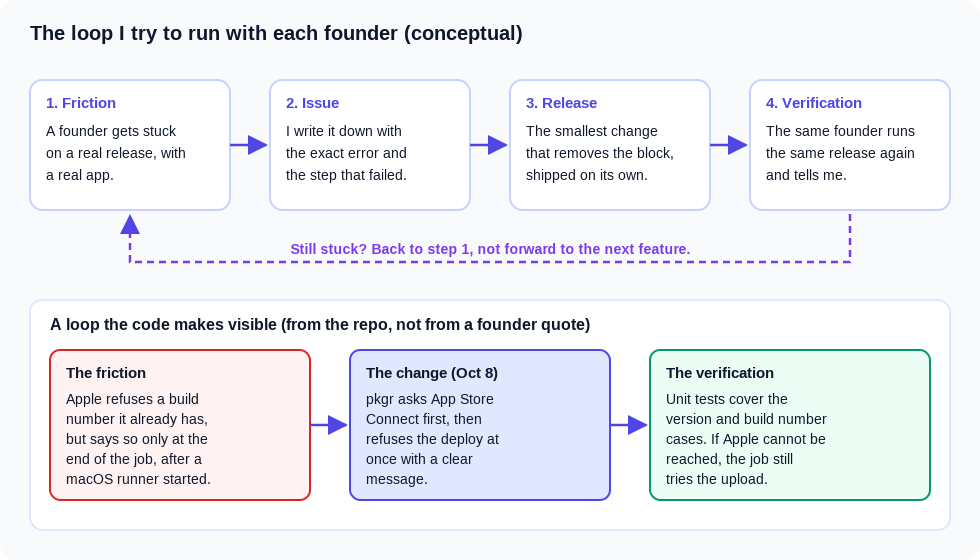
A founder gets stuck on a real release. I write down the exact error and the step that failed. I ship the smallest change that removes the block, on its own, not bundled with the next feature. Then the same founder runs the same release again and tells me whether it worked. If it did not, I go back to the start, not forward.
The lower half of the diagram shows the one loop I can reconstruct from the repository without help: the Apple version check. The friction, the change and the test coverage are all in the code. The loop above it is how I want to work, not a record of specific tickets.
Where a release stands today
Here is what one iOS release looks like now, compared to the by-hand route. The eight steps on the left are the ones I list on the pkgr home page, and the right-hand side is the product as it is in the repository today.
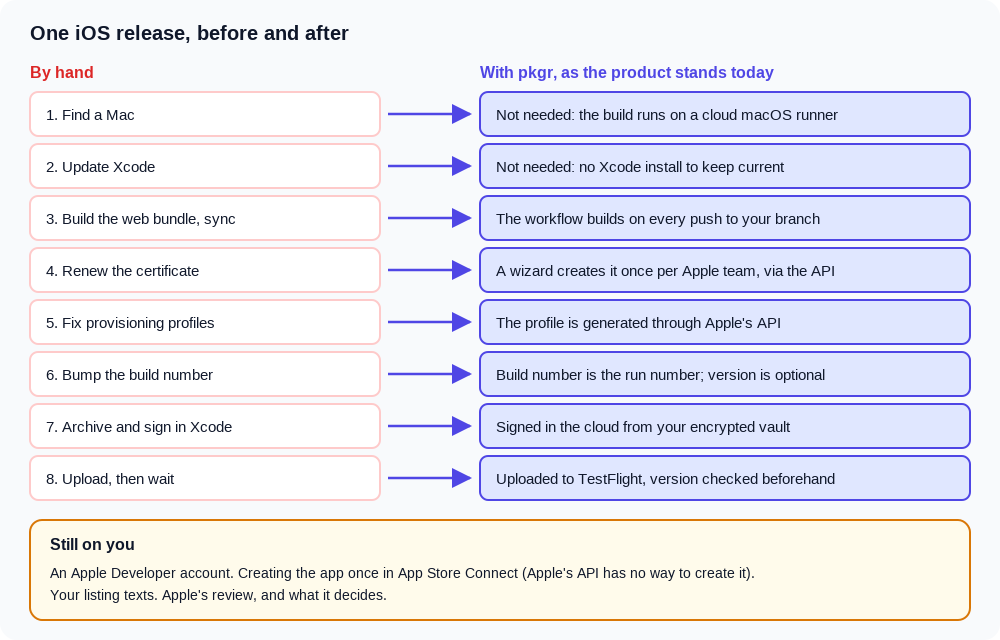
Look at the orange band first, because it matters most. You still need an Apple Developer account. You still create the app once in App Store Connect. You still write your listing texts, and Apple still decides in review. pkgr removes the machine and most of the paperwork. It does not remove the judgment of the store.
There are other limits I want to name. The whole deploy path is iOS only. Android builds are next, not shipped. The builds run in your GitHub account, so they use your GitHub Actions minutes, and pkgr cannot show you how many you have left: GitHub does not let an App installation read that billing data, going by GitHub’s documentation.
What reality taught me
Here is what the past few weeks taught me.
First, the end of the pipeline is where the friction hides. I started with the build and the certificate, because they are the interesting engineering. Most of the past few weeks went into the dull part after the build: listings, screenshots, version numbers, compliance questions. That is where an app can sit, waiting, if nothing helps.
Second, Apple’s rules take a large share of my code. It exists to say “no” earlier and more clearly than Apple does: sizes, versions, build numbers, missing fields. I did not plan for pkgr to be a translator of Apple’s errors, but it is turning into one.
Third, a one-person project needs guardrails on both sides. Users need safety nets so a mistake is cheap. I need them so a dispute does not take my payment account down.
What is next
Here are the intentions I can point to in the repository, a changelog or a plan file. They are intentions, not promises, and I am giving no dates.
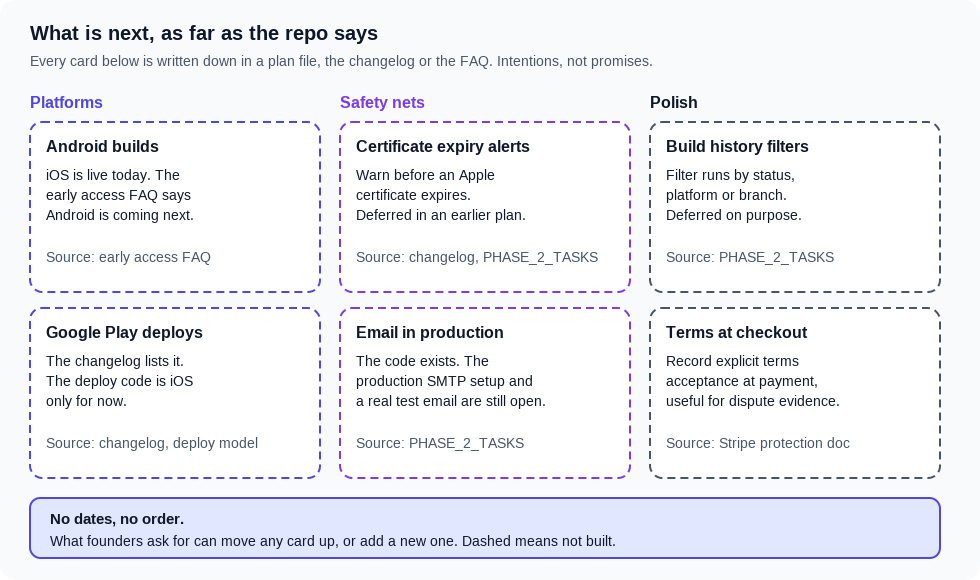
Android builds are the first card because the early access FAQ already says they are coming next, and a Google Play deploy is listed in the changelog. Certificate expiry alerts were deferred in an earlier plan, as were build history filters. Email notifications have code behind them, but the production mail setup and a real test email are still open items. Recording terms acceptance at checkout is on my dispute-protection list for evidence.
Founders can reorder all of this. One request is already on the table: turning on the Android pipeline, which is still marked “coming soon”. That is why it comes first.
The remaining spots
If this describes a problem you recognise, and you have a JavaScript app on GitHub and an Apple Developer account, the founder offer is on pkgr.app/early-access.
To be exact about what it is: USD 149, paid once, for lifetime access to the Starter plan. Starter’s limits still apply: up to 5 projects, staging builds installable for 30 days, and full analytics history. It is not every future plan and it is not unlimited use. After the 100 spots, Starter costs USD 9 a month. If you have not triggered at least one build by December 31, 2026, you are refunded in full, automatically.
I would rather you come in knowing what is missing than find out later. If something in this report looks wrong or incomplete to you, write to me. That is how the next section of this post will get written.
Keep reading
If you want the reasoning behind the price and the 100-spot cap, read why I chose a lifetime offer for my first 100 users. If you want to see what a store deploy looks like step by step, deploy to TestFlight from a git push walks through it.