12 min read
What I Learned Automating iOS Code Signing
Four lessons from automating iOS code signing in pkgr: a p12 Keychain refuses, a cross-realm test bug, Apple's certificate limits and a team ownership model.
The test failed with a DER parsing error: the parser said it had too few bytes.
That is all it said. I was finishing the certificate wizard for pkgr, the commit is dated Sunday, August 23, at 22:11, and the failing test was the one that turns a browser-generated key and an Apple certificate into a .p12 file. A DER error in that chain looks like a crypto problem. A bad key export, a wrong encoding, a certificate cut in half somewhere. That is where you start looking.
It is the wrong place. The bytes were fine. They never reached the parser. I will come back to that, because it is the most instructive bug of the whole signing feature, and the one that taught me the least about cryptography.
In under eight weeks of git history, signing in pkgr changed shape several times. Here is what each change taught me, wrong turns included. This is not a tutorial. If you want the manual way to do all this with openssl and the App Store Connect API, I wrote that separately (link at the end).
Why signing is where automation stalls
To ship an iOS build you need three things from Apple, and they come from three different places. A distribution certificate with its private key, exported as a .p12. A provisioning profile, which ties your app’s bundle id to that certificate. And, if you want to automate any of it, an App Store Connect API key, which is the only way to talk to Apple without a browser.
In pkgr the build runs on a macOS GitHub Actions runner. At run time the workflow calls pkgr with a short-lived token, downloads the .p12 and the profile, creates a temporary keychain, runs security import, and calls xcodebuild. If any of the three pieces is wrong, you find out at the end of a ten-minute build, with a message from Xcode that points anywhere but at the cause.
The real cost of signing is the distance between the mistake and the error.
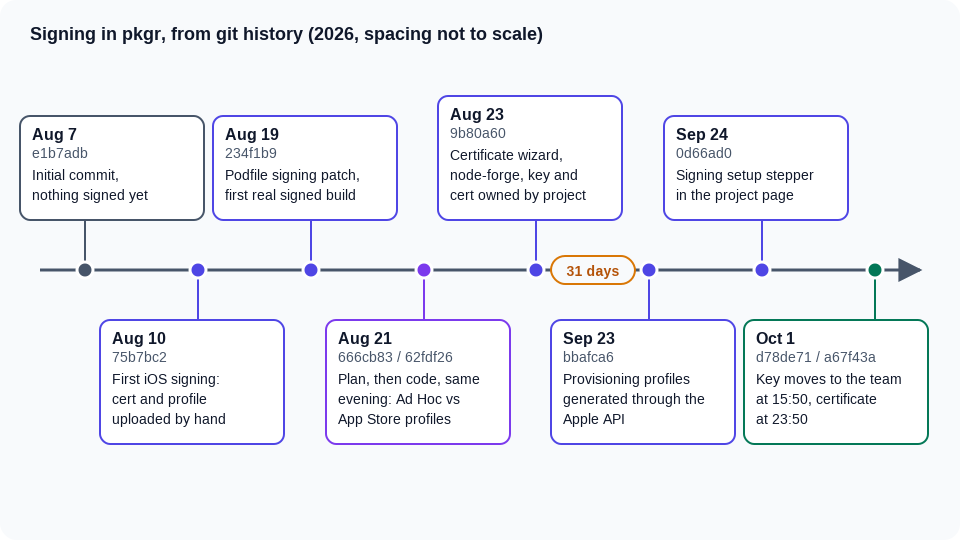
The timeline shows the real order of events. On August 10, the first iOS signing commit (75b7bc2) had users upload a certificate and a provisioning profile by hand into an encrypted vault. The first real signed build came on August 19, after a Podfile patch (234f1b9). On August 23 came the wizard that generates the certificate for you. Thirty-one days later, profile generation. Then, on October 1, the commits that changed who owns what. Each step exposed the limits of the one before.
Lesson 1: the consumer decides what “valid” means
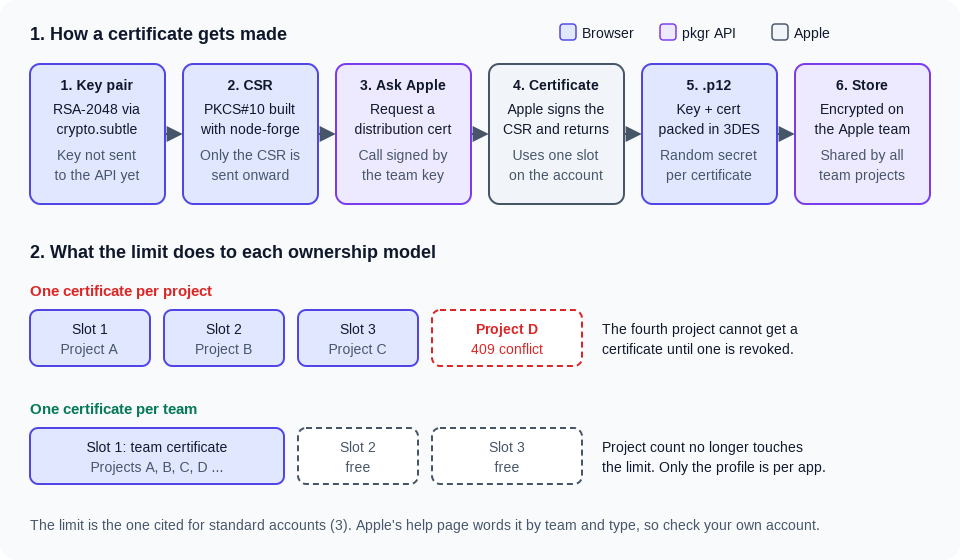
The wizard creates the certificate without the user ever opening developer.apple.com or a Mac. The browser generates an RSA-2048 key with crypto.subtle, builds a certificate signing request, and sends only the request to pkgr, which has Apple sign it through the App Store Connect API. Apple returns the certificate. The browser then packs key and certificate into a .p12.
Two libraries could build that .p12. The modern one is pkijs, which is built on WebCrypto and feels natural in a TypeScript front end. The other is node-forge, older and less fashionable. My first assumption, the one I had to unlearn, was that modern means safer, and that a file produced by a modern library would be accepted by modern Apple tooling.
It is not. A .p12 is encrypted with a password-based scheme, and there are two families. The modern one (PBES2, with AES) is what pkijs produces, and what OpenSSL 3 produces by default. The legacy one (SHA-1 with Triple DES) is what node-forge can still produce. macOS Keychain, which is what security import talks to on the runner, rejected the modern family in the test below. I read pkijs’s source at the time to confirm it had no legacy option; I did not re-test pkijs for this article, so check that if it matters to you.
What I did test for this article is the other half of the claim. I generated one throwaway key and certificate with forge, and wrote two .p12 files from them: one with algorithm: '3des', one with forge’s modern aes256. Then I imported each into a temporary keychain on macOS 26.3.1 with the same command the runner uses.
3des    ->  1 identity imported.
aes256  ->  security: SecKeychainItemImport: Unknown format in import.
Same key, same certificate, same password. Only the container encryption differs. The line in the production code is short:
forge.pkcs12.toPkcs12Asn1(privateKey, certificate, password, { algorithm: '3des' });I am not proud of choosing Triple DES. It is obsolete. I chose it because the thing that has to open this file is Apple’s parser, not mine. The file is encrypted again by pkgr at rest, with a random 32-byte secret generated by crypto.getRandomValues, so the weak container is not what protects it.
There is a test in the repo for this part, and it has a limit I should state. The spec round-trips the .p12 through forge itself: decode with the right password, same key out, wrong password rejected. That proves the file is well-formed. It does not prove Keychain will accept it, and no unit test can. The only proof is the real consumer, which is why the check above exists.
The principle: the consumer’s parser defines “correct”. Choose the format by what the last system in the chain accepts, and test against that system, not against your own library.
Lesson 2: bytes are not bytes across a boundary
Back to the DER error.
forge builds its internal buffers in a constructor that accepts a string, an ArrayBuffer, or a typed array. To know which one it got, it asks the JavaScript engine a class question. In its source it looks like this:
util.isArrayBuffer = function(x) {
  return typeof ArrayBuffer !== 'undefined' && x instanceof ArrayBuffer;
};
instanceof compares against the ArrayBuffer class of the realm where forge was loaded. A realm is a separate JavaScript world with its own copy of every built-in class: an iframe, a worker, a Node vm context. An ArrayBuffer created in another realm is a perfectly good buffer full of the right bytes, and instanceof ArrayBuffer still answers false.
My first assumption was that bytes are bytes. If WebCrypto hands me a buffer and forge asks for a buffer, they agree. In a browser they do, because there is one realm. In the test setup they did not. jsdom has no crypto.subtle, so the spec stubs in Node’s own WebCrypto. The buffers it returns come from one place and forge, loaded inside the test sandbox, checks against another. That is my reading of why. What I can show is the mechanism, in Node:
const foreign = vm.runInContext('new Uint8Array([1,2,3,4])', vm.createContext({}));
forge.util.createBuffer(foreign).length();            // 0
forge.util.createBuffer(String.fromCharCode(...foreign)).length(); // 4
An array of four bytes, from another realm, gives a forge buffer of length zero. No branch of the constructor matches, nothing throws, and the empty buffer goes on to the ASN.1 parser, which finally complains: too few bytes.
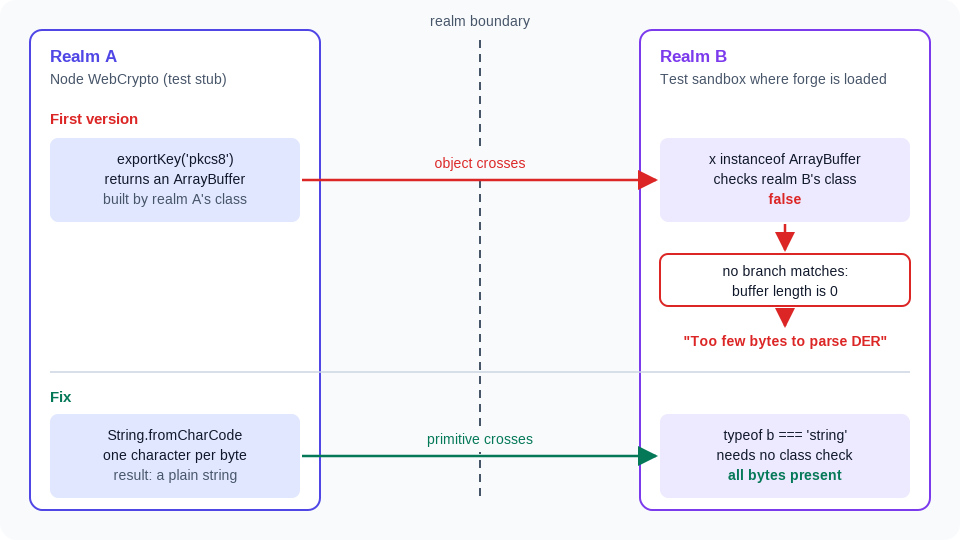
The fix is unglamorous. Convert the exported key to a binary string, one character per byte, and give forge that. A string has no class identity, so it crosses any boundary intact. I used the same conversion in the production code instead of branching on the environment, so the test exercises the path that ships.
One honest detail from my notes at the time: the bug appeared under ng test, the real Angular test builder, and not when I ran Vitest on its own. That is the second part of the lesson. A green run in a convenient runner is not the same as a green run in the one your project uses.
The principle: do not pass class instances across a boundary you do not control. Pass primitives, and run your tests in the runner you ship with.
Lesson 3: ask who owns the thing, not who uses it
This is the lesson that cost me a migration, and it is not a crypto problem at all.
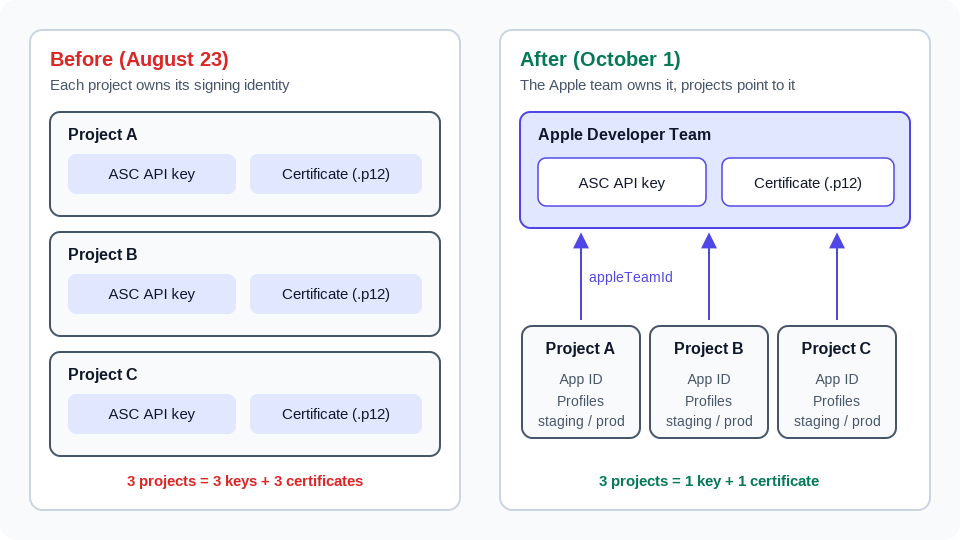
When I built the wizard on August 23, I followed the structure that already existed. The secrets vault from August 10 was per project, so the App Store Connect API key became a per-project secret (app_store_connect_key, commented in the code as “one slot per project”), and so did the generated certificate. A project, in my head, owned its signing identity, because the app belongs to the project.
Apple does not see it that way. Apple’s help page says it directly: “Distribution certificates belong to the team.” A team API key gives access to all apps, not to one. What is tied to a single app is the provisioning profile, through its bundle id. I had put the key and the certificate one level too low.
This matters because Apple counts these things per account. The figures I had in mind, and that many guides cite, are three active distribution certificates per account and 50 active API keys. I have to be careful here: Apple’s own help page words the certificate rule as ownership by the team with a per-type allowance, and I could not find the numbers stated on an official page. I did not test the limit on a live account either. That is why the error handling in the code does not parse Apple’s message text, which is not documented as stable. It maps the HTTP status, and a 409 on certificate creation becomes “limit reached”. That is an assumption, and a 409 for another reason would get the wrong message.
Even with fuzzy numbers, the arithmetic of the old model was bad. If each project generates its own certificate, the fourth project under the same Apple team fails. Asking for the same key on every project was redundant before it was broken. I did not hit this with a real user. There were none yet. I caught it by asking what Apple’s limits would do to my data model, and I fixed it on one day, in two commits: the key moved to a new AppleTeamDocument collection at 15:50 (d78de71), and the certificate followed at 23:50 (a67f43a). A project now holds an appleTeamId and nothing secret. Before writing that reference, the API checks that the team belongs to the user. Without that check, anyone could point a project at someone else’s Apple team and borrow its key.
I did not migrate existing data, since there was no real data. The old per-project documents are orphans that nothing reads. That is a shortcut I could take only because the product had no users yet, and I would not take it later.
I had actually written this reasoning down once already, on August 21. The file IOS_SIGNING_ENVIRONMENTS_PLAN.md was committed at 20:12 (666cb83), two hours before the code (62fdf26, 22:25). Its core question is the same ownership question: can one distribution certificate sign both an Ad Hoc and an App Store export, with only the profile changing? I flagged it in the plan as an assumption to verify against a real Apple account, and asked a reviewing agent to challenge it. The shipped code treats it as true: one certificate per team, a profile of type IOS_APP_ADHOC for staging and IOS_APP_STORE for production, and an export method that switches with the environment. Real builds have since gone through to TestFlight on this model. The plan file, though, still says “draft, not implemented” at the top. I did not update it, and a reader trusting that header would be wrong.
The team model has costs I should name. A certificate shared by every project of a team means regenerating it would invalidate the provisioning profiles of all of them. So the wizard offers no regeneration at all: if a team already has a certificate, it tells you why and sends you back. That is safe, and it is also an open gap, because certificates expire and the renewal flow is planned but not built yet, with no date.
Manual upload has a trade-off too. If you already have a .p12, you can upload it. It will sign builds. But it will not generate provisioning profiles for you, because Apple’s profile endpoint needs the internal id of the certificate, and a .p12 does not carry it. The wizard says so, and the API returns a dedicated error. There may be a way to recover that id from the serial number. I have not tried.
The principle: before you model a thing, find out who owns it in the system you integrate with, and who counts it. Put your data where the owner is.
Lesson 4: optional does not mean absent
The last lesson is small, and it hurt in a very quiet way.
While wiring the team link into the project update endpoint, saving a project began to fail. The UI showed a generic connection error, from my notes: a vague “cannot connect” message. Nothing in it suggested a data problem. The cause was in the update itself:
// before (simplified): doc.update({ ...dto, updatedAt })My assumption was that an optional field the client did not send simply does not exist on the DTO. It does. After Nest’s validation pipe builds the DTO class instance, an optional property that was omitted from the JSON is still there, with the value undefined. Spreading the DTO copies it. Firestore refuses undefined as a value, since ignoreUndefinedProperties is not enabled, and the whole update throws.
The fix filters the keys before writing:
const updates = Object.fromEntries(
  Object.entries(dto).filter(([, value]) => value !== undefined),
);
The test is worth a line. The fake Firestore in the spec throws on undefined the way the real SDK does, with the same message shape. The principle: a partial update should be an explicit list of keys you mean to change, and your test doubles should fail the way production fails.
What is left, and where this goes
None of the four lessons is really about signing. They are about consumers, boundaries, owners and defaults, and signing is a pipeline where all four meet with very little feedback.
The open items: a certificate renewal flow that is planned but not built, a 409 read as “limit reached” without a live check, a plan file with a stale header, and a manual-upload path that cannot generate profiles. I would rather list them than have you find them.
If you build for iOS and you would like all of this to be someone else’s problem, pkgr is what I built for that. You push to GitHub, pkgr builds, signs and ships, without Xcode and without a Mac to maintain. The Founder offer on pkgr.app/early-access is 100 spots at USD 149, paid once, for lifetime access to the Starter plan. Usage limits still apply. After the first 100, the Starter plan becomes monthly, at USD 9 per month at the time of writing. If no build has been made by December 31, 2026, the payment is refunded automatically in full.
Keep reading
If you want to do the certificate step yourself, start with how to generate an iOS distribution certificate without a Mac. For the bigger question behind this whole project, read do you need a Mac to build iOS apps in 2026.