14 min read
Capacitor, React Native or a PWA: how to choose when you already have a web app
A decision tree for developers who already ship a web app: what a PWA can do on iOS, what Capacitor and React Native add, and when each one is the wrong choice.
Picture a developer who has spent two years on a booking dashboard. It is an Angular app, deployed, with paying customers, and the browser tab is where all of them meet it. This is a composite, but I have heard the same message in several versions: customers keep asking for an app. Her manager wants one by spring, and she opens three comparison articles. One says React Native is the future. One says a PWA is enough. One says Capacitor, and it is written by a company that sells Capacitor tooling.
All three articles compare performance. That is the wrong comparison for her. She is not starting a project: she already has a large body of working web code, and the question is what each route does to it.
I will say where I stand before going further. I build pkgr.app, and pkgr supports only Capacitor projects, on iOS only. So I have an interest in Capacitor, and you should weigh my opinions accordingly. So I will say what a PWA really gets you on an iPhone, when React Native wins, and when Capacitor, and therefore pkgr, is the wrong tool. If you already have a web app, the choice is not about speed. It is about what the app must do, how much of your code you can keep, and who will maintain the native part.
I write about iOS only. Android has its own rules and I do not cover them here.
Three options, in one sentence each
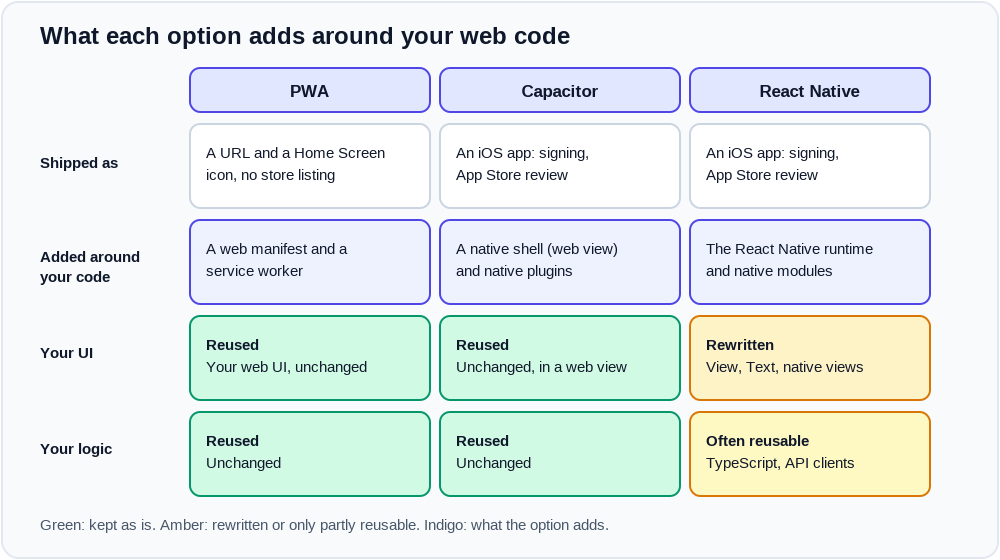
A PWA (progressive web app) is your website plus a web app manifest, a JSON file describing name and icons, and usually a service worker, a script that handles offline caching and push. Nothing is compiled.
Capacitor is a runtime that puts your built web app inside a native iOS project. The web code runs in a web view, which is a browser engine embedded in an app screen. On iOS, as far as I know, that is WKWebView, the same WebKit engine Safari uses. Native features are reached through plugins, small bridges written in Swift that your JavaScript calls.
React Native is a different thing. You write React, but the screens are not HTML. Components like View and Text become real iOS views at runtime. Its documentation is explicit that React Native does not render HTML elements, so div and span do not exist there.
That last difference matters most for you. The diagram shows what each option adds around code you already have.
Start with what the app must do
Before comparing frameworks, write down what the app needs that a website does not already do. In my experience four needs decide most cases: push notifications, the camera, Bluetooth, and in-app purchases.
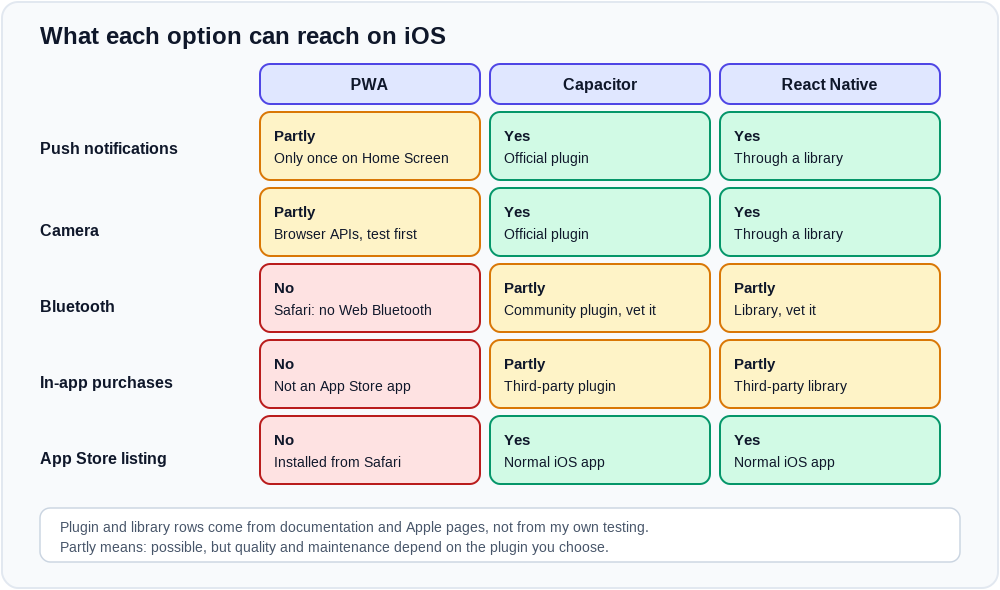
Push notifications. A PWA can do them on iOS, which surprises people who last checked years ago. WebKit’s announcement says Web Push arrived for Home Screen web apps in iOS and iPadOS 16.4. The condition is that the site is installed to the Home Screen, with a manifest whose display is standalone or fullscreen, and that the permission request comes from a direct user action such as tapping a button. In a normal Safari tab, it does not work. Capacitor has an official Push Notifications plugin, and React Native reaches push through libraries.
Camera. Capacitor’s official plugin list includes Camera. A PWA can use the browser’s media APIs, but I have not tested the details on current iOS versions, so check on a real device before you promise a scanning feature to anyone.
Bluetooth. This one is a hard stop for a PWA. Safari does not implement Web Bluetooth. I could not find a single Apple page that says so, so I rely on the compatibility tables (caniuse lists Safari on iOS as unsupported) and on a 2024 post on the W3C Web Bluetooth mailing list saying WebKit remains opposed to generic peripheral access APIs. Capacitor’s official plugin list does not include Bluetooth either. There are community plugins. Capacitor and React Native both give you a route, but you vet the plugin, and you check that it is maintained.
In-app purchases. Apple’s guideline 3.1.1 says that unlocking features or content inside an app, with subscriptions as one example, must use in-app purchase, and it forbids home-made unlocking mechanisms such as license keys or QR codes. A PWA is not an App Store app, so this question does not arise for it: you cannot sell through Apple’s system, and you are free to use your own payment provider on the web. In a Capacitor or React Native app you need a third-party plugin or library that talks to Apple’s purchase system. There are also exceptions to 3.1.1 listed in section 3.1.3, and the rules differ by storefront, so read the current text before you design your billing.
If everything on your list is a “yes” in the PWA column, you may not need an app at all. If one item is a “no” and non-negotiable, the choice is made for you.
What a PWA really does on an iPhone
I want to spend time here, because “a PWA is not a real app” is repeated too easily, and so is the opposite claim.
What I verified on WebKit’s own blog:
- Installation is manual. The user taps Share, then Add to Home Screen. WebKit’s iOS 26 notes say that by default every website added to the Home Screen now opens as a web app, a manifest is no longer required, and Safari has no installability requirements. A user can switch that off and save a plain bookmark. I did not find an Apple page describing an install prompt that your site can trigger, and as far as I know Safari does not offer one, so “how will users know to install it” is your problem to solve in the UI.
- Push works only for installed apps (above), and it uses Apple’s push service without needing an Apple Developer Program membership, according to the same announcement.
- Declarative Web Push is available for Home Screen web apps since iOS 18.4, and the Badging API is supported.
- Storage is safer than in a tab. Safari deletes script-writable storage (IndexedDB, LocalStorage, service worker caches) for a site the user has not touched in a week. WebKit wrote that Home Screen web apps are not part of Safari, count their own days of use, and that it did not expect their website data to be deleted. That post is from 2020. It is the most direct source I found, not a current guarantee.
In the EU, I know the rules for Home Screen web apps have changed more than once. I did not verify the current state on an Apple page, so if your users are mostly European, test on a real device.
Here is the feature detection I would put in a PWA before showing a “turn on notifications” button. I have not run it on a device, so treat it as a sketch.
const canUsePush =
  'serviceWorker' in navigator && 'PushManager' in window && 'Notification' in window;

// iOS Safari exposes navigator.standalone for Home Screen launches.
const isInstalled =
  window.matchMedia('(display-mode: standalone)').matches ||
  (navigator as Navigator & { standalone?: boolean }).standalone === true;

if (canUsePush && isInstalled) {
  // Show the button; call Notification.requestPermission() inside its click handler.
}
The honest summary: a PWA on iOS covers more than most people think, and it costs nothing to try first. What it cannot give you is a place in the App Store, a purchase through Apple, or hardware that Safari does not expose.
What about the code you already have
Reuse is the heart of the question, and the answer is nearly binary.
With a PWA, nothing is rewritten. With Capacitor, the web build is copied into a native project and runs as is. The commands to add it to an existing project are short:
npm install @capacitor/core @capacitor/ios
npm install -D @capacitor/cli
npx cap init "My App" com.example.myapp --web-dir dist
npx cap add ios
Set --web-dir to your build output folder (dist here, something like dist/<project>/browser for an Angular app). The appId you give becomes the iOS bundle ID, so pick it with care; I explain what that is in the iOS signing glossary. You commit the generated ios/ folder. One caveat on operating systems: on Windows or Linux, npx cap sync ios can stumble at the CocoaPods step, because CocoaPods is Apple-only. Developers report this on forums; I have not re-tested every setup.
In the same code base, you can branch on where it runs:
import { Capacitor } from '@capacitor/core';

if (Capacitor.isNativePlatform()) {
  // native push through the plugin
} else {
  // Web Push in the browser
}
With React Native, the picture is different. Navigation, styling, forms and every component that renders markup are rewritten with React Native components. Business logic written in plain TypeScript, API clients and validation can often move over, but anything touching the DOM, CSS or a web-only library cannot. For a large product with a design system, that is a second product. Be careful when someone says the rewrite is trivial because “it is also React”: the language is shared and the rendering layer is not, and you will keep two front ends in sync with the web app your customers already use.
The 4.2 risk
Apple’s guideline 4.2 is the one that frightens people who wrap a website. The text says your app should include features, content and UI that elevate it beyond a repackaged website, and that an app that is not particularly useful, unique or “app-like” does not belong on the App Store.
A PWA is outside this, since it never goes to review. A Capacitor app is exactly the kind of app the sentence is written for if it is the website with an icon. I have read Apple Developer Forums threads where wrapped apps were rejected under 4.2, including at least one with native location features and a custom plugin, which tells me that adding a plugin is not a guaranteed fix. React Native lowers the risk, because the interface is native, but no framework exempts you.
My practical reading is this. If your app only shows what the site shows, with nothing that makes sense on a phone, expect trouble in review whatever you built it with. If it uses the camera for a real task, sends relevant notifications, works when the network drops, and feels designed for a phone screen, you have given the reviewer something to approve. I am not going to give you a rejection rate, because I do not have a trustworthy number and I have seen invented ones.
The road to the App Store, option by option
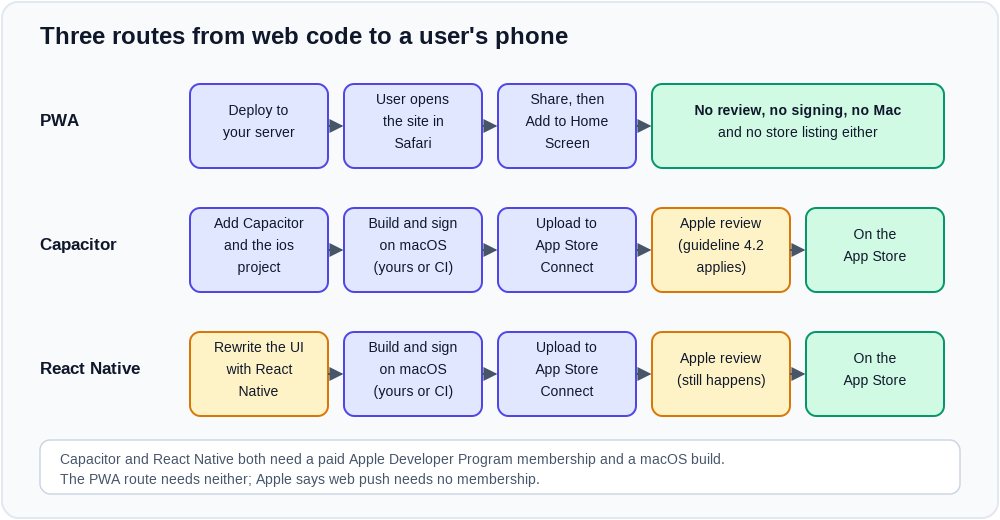
The PWA lane is short on purpose. You deploy, users install. There is no signing, no review and no membership fee tied to it.
The two other lanes are the same after the code step. Both need a paid Apple Developer Program membership (I wrote about the account in Apple Developer account for web developers). Both need a build and signature made by Xcode, which means macOS. Apple’s own page on upcoming requirements says apps uploaded to App Store Connect must be built with Xcode 26 or later with the iOS 26 SDK, which has applied since April 28, 2026.
The Mac question does not separate Capacitor from React Native. It separates both from the PWA. I covered who runs that Mac in Do you need a Mac to build iOS apps in 2026. Expo, the React Native toolchain, has its own cloud build service; I have not used it.
What it costs to keep going
Choosing is the cheap part. Upkeep after launch is where the options differ.
| PWA | Capacitor | React Native | |
|---|---|---|---|
| Code you maintain | One web app | One web app plus a thin native project | Web app plus a separate mobile app |
| Apple changes that reach you | Rarely, through Safari updates | Xcode and SDK requirements, signing renewals | Same as Capacitor, plus framework upgrades |
| Mac and signing | None | Needed for builds | Needed for builds |
| Biggest recurring risk | A browser feature you rely on changes | A plugin goes unmaintained | Two code bases drift apart |
For Capacitor, the plugin ecosystem is where upkeep hides: official plugins are maintained by the Capacitor team, community ones by whoever wrote them. Certificates and profiles also expire in both native routes, and someone has to notice. That is the loop I described in the Mac article.
The decision tree
Here is everything above in one diagram.
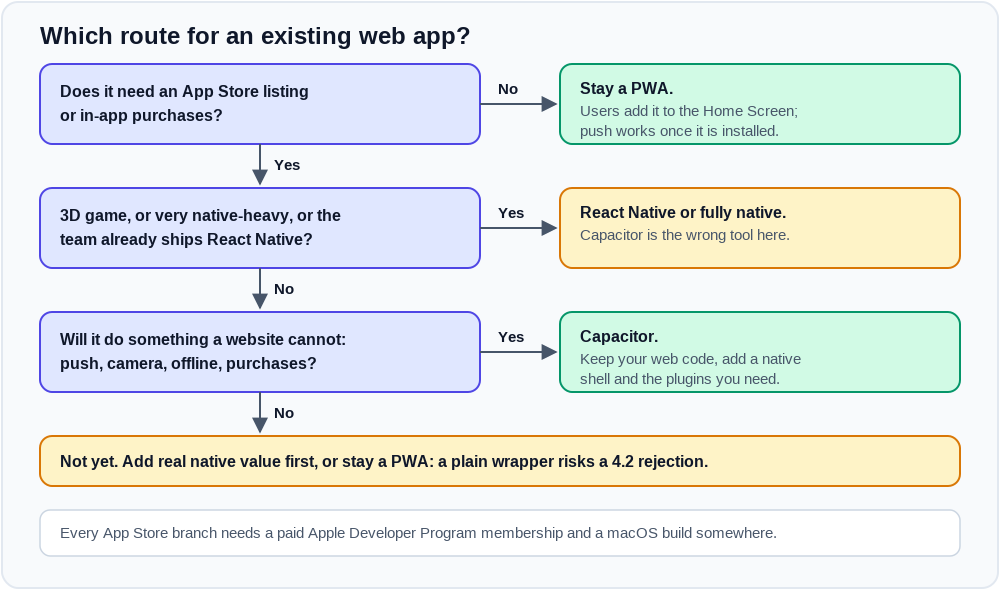
The first question is the PWA gate: do you need a store listing, or Apple’s purchase system? If neither, start with the PWA. You can wrap it later, and a PWA that works well is a good base for Capacitor.
The second question is the exit toward React Native or fully native code, covered in the next section.
The third question is the 4.2 guard. If the answer is that your app will do nothing a website does not, the tree says “not yet”, and I mean it. A wrapper that adds nothing may pass review once, and it gives users no reason to prefer it to the site.
When Capacitor is not the right choice
Here are the cases where I would not use Capacitor, and therefore not pkgr.
A 3D game, or anything graphics-heavy. A web view is a browser. If the core of your product is a real-time 3D scene or a physics-heavy game, you want a game engine or native code. I will not invent a threshold for where the web view stops being enough. If this is your product, you already know.
Very high native intensity. Constant background Bluetooth sessions, continuous sensor streaming, deep operating system integration, custom camera pipelines, widgets and system extensions. You can write Capacitor plugins in Swift, but when the native side becomes most of the app, you are maintaining a native app with a web view inside, and it would be more honest to build it natively or with React Native.
A team already on React Native. If your developers know it, your design system exists in it, and the mobile app is the main product, rewriting it in a web view makes no sense.
You need no store presence. If a Home Screen icon is enough and your needs fit the PWA column, a native shell adds a membership, a signing setup and a review queue for nothing you need.
What pkgr does here, and what it does not
Once you have chosen Capacitor, the remaining work is Apple’s side: signing, building on a Mac, uploading.
pkgr runs a workflow in your own GitHub repository. It builds a Capacitor iOS app on a macOS runner, signs it, installs staging builds on your phone through an over-the-air link, and deploys to TestFlight and App Store Connect. If your repository does not have Capacitor yet, the auto-configure step makes a commit that installs it with the iOS platform, and asks for your webDir. The workflow itself runs npm ci, npm run build and npx cap sync ios, so any web app that builds with npm is a candidate. I have only documented Angular as a worked example, and I will not claim support for other frameworks that I have not tested.
What pkgr does not do matters for this article in particular.
- It does not build React Native, Expo, Flutter or native Swift projects.
- It does not build Android. Android is listed as coming soon, not available.
- It has no simulator. To step through native code you still need a Mac.
- It does not create the app record in App Store Connect, because Apple’s API does not allow it, and you remain the owner of your Apple account and key.
- It does not install production builds over the air. Production goes through TestFlight.
Builds run in your GitHub account, on your Actions minutes.
Where I land
If I were the developer with the booking dashboard, I would do this. First I would write down what the phone app must do that the site cannot. Then I would ship the cheap PWA improvements, a manifest, good icons and a push opt-in for installed users, and see whether anyone cares. If a “no” in the matrix stood in my way, or if the business needs the store, I would add Capacitor to the same repository and build the one or two native features that give the app a reason to exist. I would pick React Native only if the mobile app were becoming the main product, or if the native needs were large.
If you land on Capacitor and want the Apple half handled, start free at pkgr.app/early-access. The Free plan covers one project and needs no credit card. The setup steps are in the quickstart.
Keep reading
If the Apple account is what worries you, Apple Developer account for web developers walks through individual versus organization and what delays enrollment. For the vocabulary that every native route shares, the iOS signing glossary for web developers explains certificates, profiles and bundle IDs with web analogies. And if you chose Capacitor and want to know who runs the Mac behind your builds, read Do you need a Mac to build iOS apps in 2026.