11 min read
Deploy to TestFlight from a git push with GitHub Actions
A working GitHub Actions workflow to sign, archive and upload an iOS app to TestFlight on every push, with build numbers, Apple processing and failure modes.
A tester writes that the login button does nothing on their iPhone. It is eleven at night. The fix takes ten minutes. I push it, and then I realise that the push was the easy part.
Between my commit and their phone there is still an archive, a signature, an upload, a queue at Apple and a compliance question nobody warned me about. If you own a Mac, you know the ritual. Open Xcode. Bump the build number. Product, Archive. Wait. Distribute App. Pick the certificate and the profile. Wait again. Upload. Then refresh App Store Connect until the build appears, and refresh again until the yellow warning goes away.
None of it is hard. That is the problem. It is a dozen small steps, each of them can fail late, and the whole thing lives in your head and on one machine.
This article replaces the ritual with one workflow file. You push to main, a macOS runner on GitHub builds and signs the app, uploads it to App Store Connect, and the build lands in TestFlight. I wrote it for a Capacitor project (a web app in a native shell), but signing and upload are the same for any iOS app. At the end I show what pkgr.app does with the same steps, because I am building it. The manual method works without it.
A runner is a Mac you rent for ten minutes
A GitHub-hosted macOS runner is a Mac created for your job and erased afterwards. Anything you click in Xcode can be a shell command there, so the commands are not the real difficulty.
The difficulty is that your own Mac quietly remembers three things for you. It holds your identity: the distribution certificate and its private key. It holds your permission: the provisioning profile that says this bundle ID may be signed for the App Store. And it holds your history: Apple knows the last build number you uploaded. A fresh runner remembers none of it. Each run, you hand it the first two and a rule for the third.
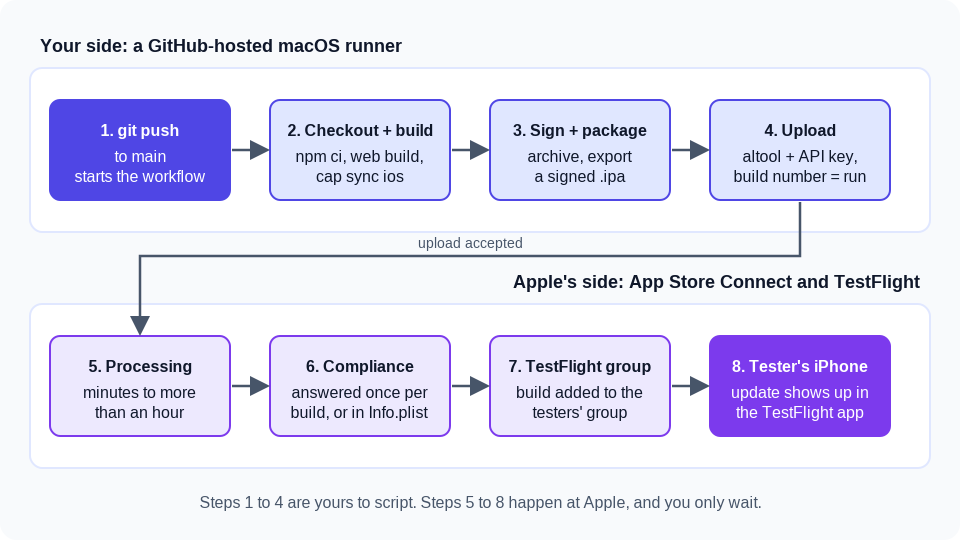
Steps 1 to 4 run on the runner and you control them. Steps 5 to 8 happen at Apple. You cannot speed them up, but you can stop them stalling on a forgotten question.
Prepare what Apple needs once
You need four things at Apple. An app record in App Store Connect for your bundle ID (the API cannot create it, so this one is manual). A distribution certificate exported as a .p12 file; if you have no Mac for that, I wrote a how-to on generating it with openssl and the API. An App Store provisioning profile for the bundle ID. And a team API key from App Store Connect, under Users and Access, Integrations.
Store six repository secrets. Certificates and keys must never be committed.
IOS_CERT_P12_BASE64andIOS_CERT_PASSWORD: the certificate file, base64-encoded, and its export password.IOS_PROFILE_BASE64: the provisioning profile, base64-encoded.ASC_KEY_ID,ASC_ISSUER_IDandASC_KEY_P8: the key id, the issuer id from the Keys page, and the full text of the.p8file.
The GitHub CLI reads a secret from standard input, so nothing lands in your shell history.
base64 -i cert.p12 | gh secret set IOS_CERT_P12_BASE64
base64 -i app.mobileprovision | gh secret set IOS_PROFILE_BASE64
gh secret set ASC_KEY_P8 < AuthKey_ABC123DEFG.p8
On Linux, use base64 -w0.
The workflow
Here is the complete .github/workflows/testflight.yml. The blocks are explained below.
name: TestFlight

on:
  push:
    branches: [main]
  workflow_dispatch:

concurrency:
  group: testflight
  cancel-in-progress: false

defaults:
  run:
    shell: bash

jobs:
  testflight:
    runs-on: macos-26
    timeout-minutes: 45
    steps:
      - uses: actions/checkout@v4

      - uses: actions/setup-node@v4
        with:
          node-version: 22
          cache: npm

      - name: Build web app and sync iOS project
        run: |
          npm ci
          npm run build
          npx cap sync ios

      - name: Prepare paths and build number
        env:
          RUN_NUMBER: ${{ github.run_number }}
          OFFSET: ${{ vars.BUILD_NUMBER_OFFSET || 0 }}
        run: |
          echo "BUILD_NUMBER=$((RUN_NUMBER + OFFSET))" >> "$GITHUB_ENV"
          echo "KEYCHAIN_PATH=$RUNNER_TEMP/signing.keychain-db" >> "$GITHUB_ENV"
          echo "ARCHIVE_PATH=$RUNNER_TEMP/App.xcarchive" >> "$GITHUB_ENV"
          echo "EXPORT_PATH=$RUNNER_TEMP/export" >> "$GITHUB_ENV"

      - name: Install certificate and provisioning profile
        env:
          CERT_BASE64: ${{ secrets.IOS_CERT_P12_BASE64 }}
          CERT_PASSWORD: ${{ secrets.IOS_CERT_PASSWORD }}
          PROFILE_BASE64: ${{ secrets.IOS_PROFILE_BASE64 }}
        run: |
          KEYCHAIN_PASSWORD=$(openssl rand -base64 24)
          echo "::add-mask::$KEYCHAIN_PASSWORD"

          echo -n "$CERT_BASE64" | base64 --decode -o "$RUNNER_TEMP/cert.p12"
          echo -n "$PROFILE_BASE64" | base64 --decode -o "$RUNNER_TEMP/app.mobileprovision"

          security create-keychain -p "$KEYCHAIN_PASSWORD" "$KEYCHAIN_PATH"
          security set-keychain-settings -lut 21600 "$KEYCHAIN_PATH"
          security unlock-keychain -p "$KEYCHAIN_PASSWORD" "$KEYCHAIN_PATH"
          security import "$RUNNER_TEMP/cert.p12" -P "$CERT_PASSWORD" -A -t cert -f pkcs12 -k "$KEYCHAIN_PATH"
          security set-key-partition-list -S apple-tool:,apple: -k "$KEYCHAIN_PASSWORD" "$KEYCHAIN_PATH" > /dev/null
          security list-keychains -d user -s "$KEYCHAIN_PATH" $(security list-keychains -d user | sed 's/"//g')

          security cms -D -i "$RUNNER_TEMP/app.mobileprovision" > "$RUNNER_TEMP/profile.plist"
          PROFILE_UUID=$(/usr/libexec/PlistBuddy -c "Print :UUID" "$RUNNER_TEMP/profile.plist")
          PROFILE_NAME=$(/usr/libexec/PlistBuddy -c "Print :Name" "$RUNNER_TEMP/profile.plist")
          TEAM_ID=$(/usr/libexec/PlistBuddy -c "Print :TeamIdentifier:0" "$RUNNER_TEMP/profile.plist")
          APP_ID=$(/usr/libexec/PlistBuddy -c "Print :Entitlements:application-identifier" "$RUNNER_TEMP/profile.plist")
          mkdir -p ~/Library/MobileDevice/Provisioning\ Profiles
          cp "$RUNNER_TEMP/app.mobileprovision" ~/Library/MobileDevice/Provisioning\ Profiles/$PROFILE_UUID.mobileprovision
          {
            echo "PROFILE_NAME=$PROFILE_NAME"
            echo "TEAM_ID=$TEAM_ID"
            echo "BUNDLE_ID=${APP_ID#$TEAM_ID.}"
          } >> "$GITHUB_ENV"

      - name: Archive
        run: |
          xcodebuild archive \
            -workspace ios/App/App.xcworkspace \
            -scheme App \
            -configuration Release \
            -destination "generic/platform=iOS" \
            -archivePath "$ARCHIVE_PATH" \
            CODE_SIGN_STYLE=Manual \
            CODE_SIGN_IDENTITY="Apple Distribution" \
            DEVELOPMENT_TEAM="$TEAM_ID" \
            PROVISIONING_PROFILE_SPECIFIER="$PROFILE_NAME" \
            CURRENT_PROJECT_VERSION="$BUILD_NUMBER"

      - name: Check the build number inside the archive
        run: |
          APP_PLIST=$(ls -d "$ARCHIVE_PATH"/Products/Applications/*.app | head -n 1)/Info.plist
          ACTUAL=$(/usr/libexec/PlistBuddy -c "Print :CFBundleVersion" "$APP_PLIST")
          echo "CFBundleVersion in archive: $ACTUAL"
          [ "$ACTUAL" = "$BUILD_NUMBER" ] || { echo "::error::Expected build $BUILD_NUMBER, got $ACTUAL"; exit 1; }

      - name: Export IPA
        run: |
          cat > "$RUNNER_TEMP/exportOptions.plist" <<PLIST
          <?xml version="1.0" encoding="UTF-8"?>
          <!DOCTYPE plist PUBLIC "-//Apple//DTD PLIST 1.0//EN" "http://www.apple.com/DTDs/PropertyList-1.0.dtd">
          <plist version="1.0">
          <dict>
            <key>method</key><string>app-store-connect</string>
            <key>teamID</key><string>$TEAM_ID</string>
            <key>signingStyle</key><string>manual</string>
            <key>provisioningProfiles</key>
            <dict><key>$BUNDLE_ID</key><string>$PROFILE_NAME</string></dict>
          </dict>
          </plist>
          PLIST
          xcodebuild -exportArchive \
            -archivePath "$ARCHIVE_PATH" \
            -exportOptionsPlist "$RUNNER_TEMP/exportOptions.plist" \
            -exportPath "$EXPORT_PATH"

      - name: Upload to App Store Connect
        env:
          ASC_KEY_ID: ${{ secrets.ASC_KEY_ID }}
          ASC_ISSUER_ID: ${{ secrets.ASC_ISSUER_ID }}
          ASC_KEY_P8: ${{ secrets.ASC_KEY_P8 }}
        run: |
          mkdir -p ~/.appstoreconnect/private_keys
          printf '%s\n' "$ASC_KEY_P8" > ~/.appstoreconnect/private_keys/AuthKey_$ASC_KEY_ID.p8
          IPA=$(find "$EXPORT_PATH" -name '*.ipa' | head -n 1)
          xcrun altool --upload-app -f "$IPA" -t ios \
            --apiKey "$ASC_KEY_ID" --apiIssuer "$ASC_ISSUER_ID"

      - name: Clean up
        if: always()
        run: |
          security delete-keychain "$KEYCHAIN_PATH" || true
          rm -f ~/.appstoreconnect/private_keys/AuthKey_*.p8
          rm -f ~/Library/MobileDevice/Provisioning\ Profiles/*.mobileprovision
I trigger on pushes to main and keep workflow_dispatch for manual runs. I pin macos-26 instead of macos-latest. Today macos-latest points to the macOS 26 image, whose default is Xcode 26.6, and Apple requires Xcode 26 for uploads since April 28, 2026. Pinning keeps my Xcode from changing under me. The web part is ordinary: install, build, then npx cap sync ios, which copies the bundle into the native project. For a native Swift app, delete those lines.
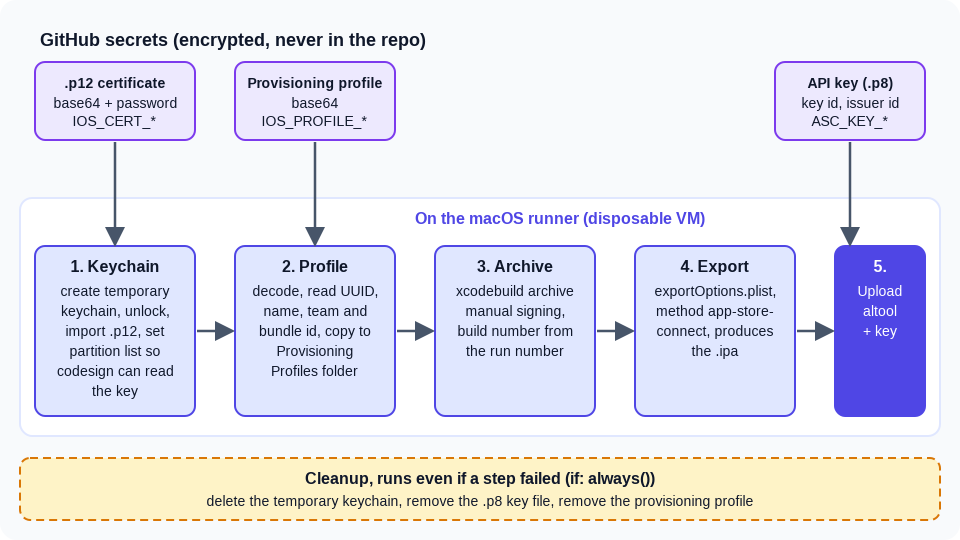
The signing step frightens people, so look at the second diagram. The runner creates a brand-new keychain with a random password, and ::add-mask:: hides that password in the logs. The .p12 goes into that keychain, never the system one. The line people forget is set-key-partition-list. Without it, codesign cannot use the private key without a prompt, and on a machine with no screen the prompt is never answered. The step then reads the profile with security cms -D and PlistBuddy, because the archive needs its name, team id and bundle ID, and I would rather read them than hard-code them.
The archive passes everything on the command line: manual signing, the Apple Distribution identity, the team, the profile name and the build number. The check after it compares the archive’s real CFBundleVersion to the one I asked for. Export needs an exportOptions.plist whose method matches your profile type (an Ad Hoc profile with an App Store export fails). Apple renamed the methods in Xcode 15.3, so app-store is deprecated in favour of app-store-connect. The upload uses xcrun altool, which looks for AuthKey_<id>.p8 in a few folders, including ~/.appstoreconnect/private_keys. The last step runs if: always(). A hosted VM is destroyed anyway, but on a self-hosted runner this cleanup is not optional.
The build number rule
Every upload needs a build number higher than the previous upload of the same version. These are two fields. The version, CFBundleShortVersionString, is what users see. The build, CFBundleVersion, is how Apple tells your uploads apart. Apple documents it as one to three period-separated integers, digits and periods only, so a commit hash will not work.
The trap: a fresh Capacitor project sets the build number to 1 in the Xcode project, and nothing ever changes it. The first upload goes through. The second is refused with a message saying CFBundleVersion must contain a higher version than the previous upload. That happened to me on October 7. Apple only said so at the end of a job that had booted a macOS runner for nothing.
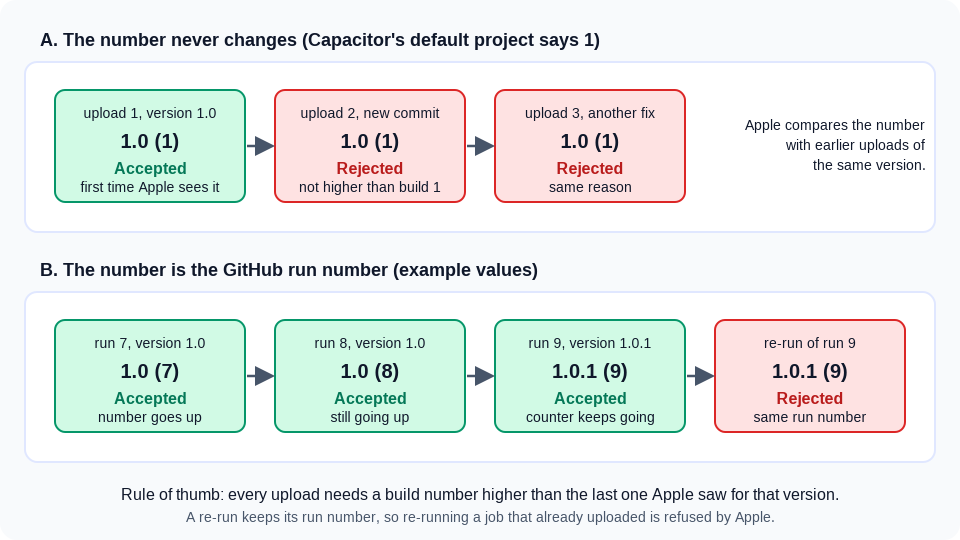
My fix is github.run_number, which GitHub documents as a counter starting at 1 and increasing with each new run. It needs no database. The workflow feeds it to the CURRENT_PROJECT_VERSION build setting. That only works if Info.plist uses $(CURRENT_PROJECT_VERSION) for CFBundleVersion; if someone hard-coded a value, the override is ignored without any error. Hence the check step.
Run numbers have weak spots. A re-run keeps its run number, so re-running a job that already uploaded gets refused. The counter also belongs to one workflow file. And if you upload from a laptop too, or migrate from another pipeline, Apple may already hold a higher number. That is the reason for the optional BUILD_NUMBER_OFFSET variable: set it once to the highest build Apple has seen. The version stays yours to raise by hand.
What happens after the upload
When altool ends without an error, nothing is available yet. The binary goes into Apple’s processing, and you get an email when it is done. It can take from a few minutes to more than an hour.
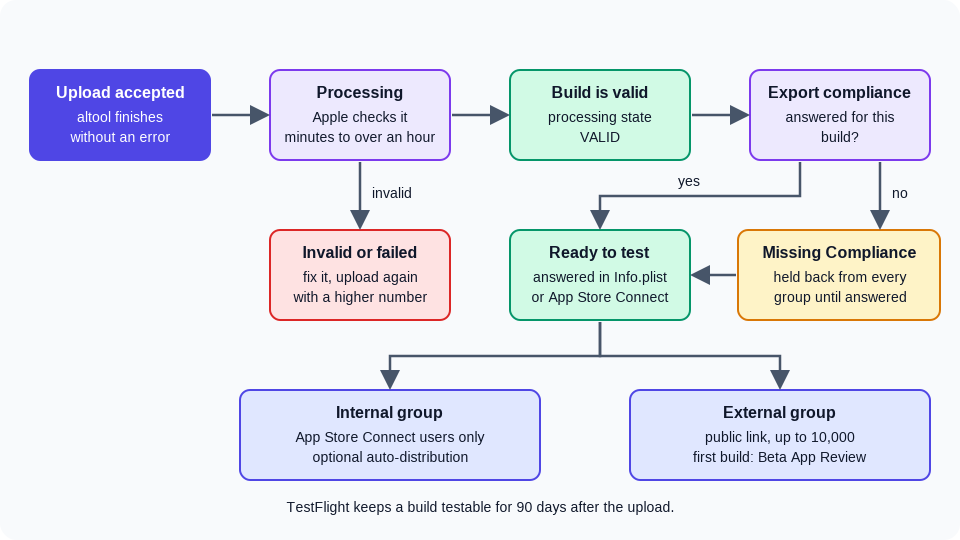
An invalid build means you start over with a new number. A valid one meets the question that costs people an evening: export compliance. Apple asks whether the app uses encryption beyond exempt forms. If nobody answers, TestFlight shows Missing Compliance and does not give the build to testers.
You can answer once for all builds in Info.plist. Apple’s documentation says to set ITSAppUsesNonExemptEncryption to NO if the app and its libraries use no encryption, or only exempt forms such as HTTPS through the operating system.
<key>ITSAppUsesNonExemptEncryption</key>
<false/>
Careful: proprietary encryption means YES, and then Apple asks for documents. Exempt apps may also need a year-end self-classification report to the US government. I am not a lawyer, so read Apple’s page before copying my line.
Finally, TestFlight works with groups. An internal group takes up to 100 App Store Connect users, meaning people with a role on your team, and has a checkbox for automatic distribution. An external group takes up to 10,000 testers by invitation or public link, and its first build goes through Beta App Review. Builds stay testable for 90 days. Create the internal group once with automatic distribution, add yourself, and later runs need no clicks.
Failure modes that cost hours
The keychain that blocks signing. Skip set-key-partition-list, or forget to unlock the keychain or add it to the search list, and codesign fails or hangs. The error you will meet most often mentions errSecInternalComponent. Check those three lines first.
The Pods that refuse a profile. CODE_SIGN_STYLE=Manual on the command line applies to every target, including CocoaPods libraries, and Xcode complains that a Pod does not support provisioning profiles. The usual fix goes in the Podfile’s post_install block:
installer.pods_project.targets.each do |target|
  target.build_configurations.each do |config|
    config.build_settings['CODE_SIGNING_ALLOWED'] = 'NO'
  end
end
The green step that lied. Without shell: bash, GitHub runs steps without pipefail. Pipe xcodebuild into tee to keep a log and a failed archive can exit with the status of tee; the failure appears two steps later, in the wrong place. With shell: bash, GitHub runs -eo pipefail. My own pkgr template still has this weakness in some steps. It is on my list.
The drifting runner and the expiring certificate. Xcode changes with the runner image and Apple raises its minimum SDK, so pin the image. Certificates also expire, with a signing error that never mentions the date, so write the expiry in your calendar.
What I could not run
I tested the shell parts on macOS with throwaway data: the base64 round trip, a temporary keychain with a self-signed certificate, the import and partition list, the PlistBuddy parsing, and the exportOptions.plist, which plutil -lint accepts. I parsed the workflow as YAML and ran bash -n on each run block. I did not run xcodebuild or altool, because there is no Xcode on my development machine. The workflow follows GitHub’s guide for signing Xcode apps and Apple’s documentation, and mirrors the template pkgr uses to ship real builds, with two differences: I wrote app-store-connect and Apple Distribution, where the pkgr template still uses the older app-store and iPhone Distribution. If your first error is there, start there.
The shortcut: the same steps in pkgr
The certificate and the profile do not live in GitHub secrets. A wizard creates them through the App Store Connect API and they sit encrypted in pkgr’s vault. The runner fetches them at run time with a short-lived token and uses a temporary keychain, as above.
The build number is the run number. You can also type a version on the build page, and an archive check fails the job if the numbers inside do not match. Before a deploy, pkgr asks Apple for the highest published version and the highest build number, and refuses immediately if the upload would be rejected, so you do not wait for a macOS runner to find out.
A push to the configured branch starts a staging build automatically. A production build and the deploy to TestFlight are started from the dashboard, and deploying needs a paid plan. The deploy is a separate workflow that downloads the IPA the build already produced and uploads it, without rebuilding or re-signing.
After Apple finishes processing, pkgr checks the build through the API. When it is valid, pkgr sends the export compliance answer (from the encryption box on the build form) and attaches the build to the App Store version. If that fails, an orange banner shows the reason and the deploy stays successful, because the upload was. pkgr does not manage TestFlight groups: you create the internal group with automatic distribution once, by hand. I tested this path for real on October 8: build 5, version 1.0.1, no Missing Compliance warning, and the build appeared in my internal group.
The last piece is live logs. GitHub has no public API to read the log of a job that is still running; in my tests the endpoint returned 404 until the job completed. So the runner sends its own output to pkgr every few seconds and you watch the build as it happens. Steps that handle secrets are left out of that capture on purpose. When the job ends, pkgr switches to GitHub’s official, masked log.
The limits: pkgr targets web apps wrapped in Capacitor, not native Swift projects. Run numbers have the weaknesses above.
Try it, or keep the file
The workflow above is yours to keep. If you would rather not maintain signing and Apple’s moving rules, try pkgr at pkgr.app/early-access.
The Founder offer is limited to 100 spots: USD 149 paid once, for lifetime access to the Starter plan (usage limits still apply). After the 100 spots, Starter goes monthly, at USD 9 per month at the time of writing. If no build has been made by December 31, 2026, you get a full automatic refund.
Keep reading
The certificate is the part where most people get stuck, and I cover it in how to generate an iOS distribution certificate without a Mac. For the story behind pkgr’s signing code and what broke along the way, read what I learned automating iOS code signing.