11 min read
Do you need a Mac to build iOS apps in 2026?
You may not need to own a Mac to ship an iOS app. A Mac and Xcode still sit in the loop, though. The real question is who maintains it and what it costs you.
Picture a student on a Windows laptop. This is a composite, not a real person, but the scene is common. She spent four months on her app. It runs in the browser, it runs on her Android phone, her friends have tested it. She opens the App Store Connect documentation to find out how to publish, and on the third page she reads the sentence that ends the evening: you build iOS apps with Xcode, and Xcode runs on a Mac.
She closes the laptop. A Mac is a big purchase for a student, and she is not wrong to feel stuck. I think the usual answer to her problem is half right, and the wrong half costs people a lot of time. So here is my position in one line. You do not need to own a Mac to ship an iOS app. You do need someone to run one for you, and the real cost is who looks after it.
The question underneath
“Do I need a Mac?” is the wrong question. It mixes up two things: owning a machine and having a macOS build happen somewhere.
Apple’s side of the deal has not changed. To put an app on TestFlight or the App Store you need three things:
- Xcode, Apple’s toolchain, which runs only on macOS.
- A paid Apple Developer Program membership.
- A distribution certificate and a provisioning profile that tie your build to your Apple account.
Nothing in that list says the Mac has to sit on your desk. It says a Mac has to exist when your app is compiled and signed. The gap between “a Mac must exist” and “I must own one” is where all the options live. One camp says you can’t ship without a Mac, which is true as a build step and false as a purchase. The other camp says the cloud has removed the Mac, which is false. The cloud has moved the Mac to someone else’s building.
I should be clear about my own marketing here. The pkgr.app landing page says “No Mac, no Xcode”. The accurate version is “no Mac of yours”. When you push your code, a Mac somewhere still runs xcodebuild.
What an iOS release is made of
A release is not one step. It is five layers, and only some of them need Apple’s tools.
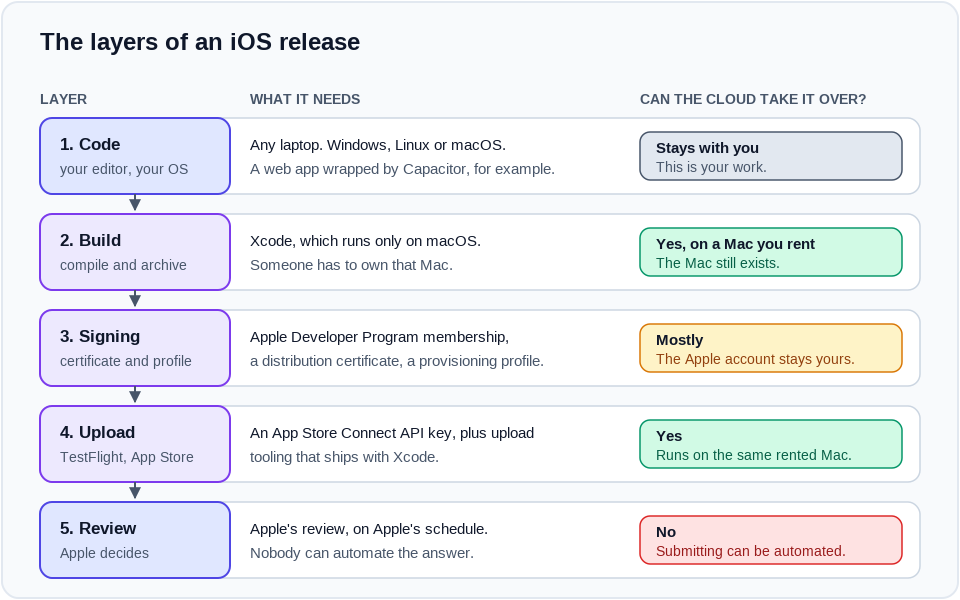
The first layer is your code. It can be written on any operating system, and if your app is a web app wrapped with a tool like Capacitor, most of the development happens in a browser. This layer has never needed a Mac.
The second layer is the build, the one that makes the headlines. Compiling and archiving an iOS app uses Xcode and the iOS SDK, and there is no supported way around that. This layer can be rented, borrowed or automated, but not deleted.
The third layer is signing, where most of the quiet pain lives. Your build must be signed with a certificate that belongs to your Apple account and matched with a provisioning profile that names your app. Apple exposes parts of this through the App Store Connect API, so signing can be automated without ever opening Keychain Access. The account itself cannot be automated away: you stay the member of the Developer Program.
The fourth layer is the upload to TestFlight or the App Store, which uses tooling that ships with Xcode. It runs on the same Mac as the build, so it travels with it.
The fifth layer is Apple’s review. Some pitches blur this one. A cloud service can submit your version for review. It cannot make the answer come faster or turn a rejection into an approval.
Read the diagram top to bottom and the layers that need a Mac turn out to be neighbours. If you can hand one of them to a machine that is not yours, you can usually hand over all of them.
The cost nobody puts on the invoice
If a Mac is available to you, why not use it as your build machine? Sometimes you should. But people price it as a purchase, a one-time number, and then discover it is a subscription paid in attention. A Mac that builds your releases has to stay in a state where a release can succeed on any given day, and that state keeps drifting.
Apple raises the minimum Xcode version required for uploads on a regular basis. In April 2025, for example, uploads had to be built with Xcode 16 or later. A new Xcode often needs a newer macOS, so the machine needs an operating system update before it can build. Each Xcode is a large download, and simulators and build caches pile up beside it until the disk is full at the wrong moment.
Then there is the keychain. Signing on a Mac depends on certificates and private keys stored there. A keychain that is locked on a machine nobody is logged into, or that holds a stale identity next to the new one, produces a signing error that says little about the cause. Certificates and provisioning profiles also carry a fixed end date, and the day you find out is usually the day you wanted to ship. And if the only copy of your private key lived on a Mac that died, you are buying a new Mac and also asking Apple for a new certificate.
None of these problems is hard. That is the point. Each one is a small task that comes back on a schedule you do not control, and together they turn “I build iOS apps” into “I also run a build server”.
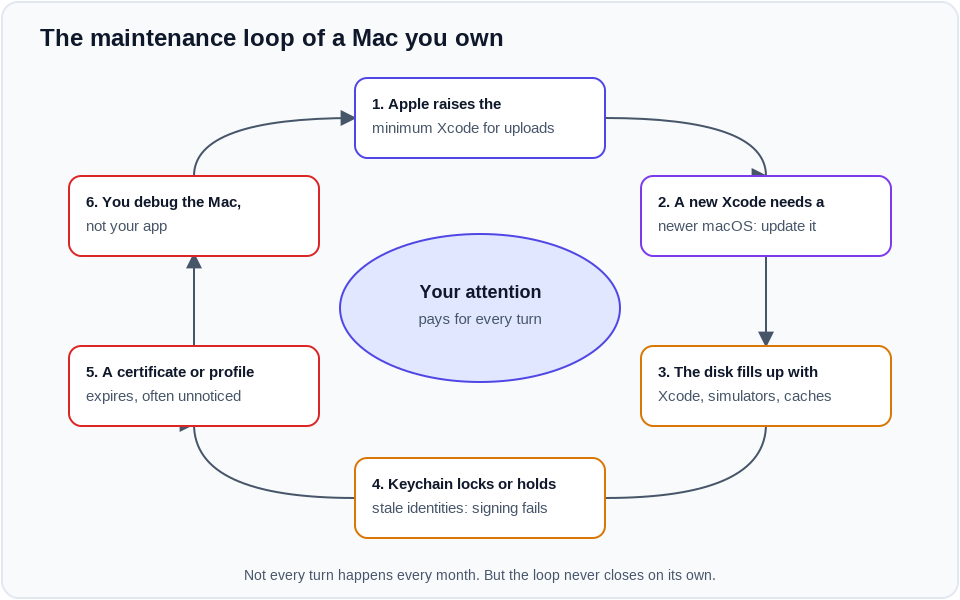
I call it the invisible loop, because it never appears as a line item. You pay for it in the hour you lose before a release and the evening you spend learning why codesign is angry.
Four ways to get a Mac into the loop
Once you separate “a Mac must run the build” from “I must own the Mac”, the options spread along a line. I will describe them as fairly as I can, without prices, because prices change and your usage will not match mine.
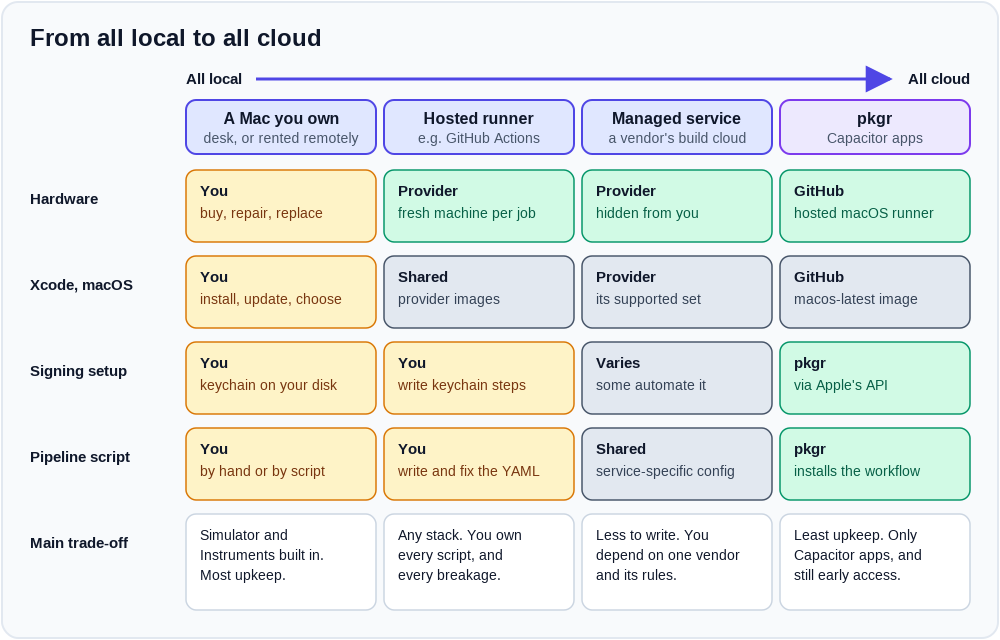
The first option is a Mac you own, or one you rent remotely. It gives you the simulator, Instruments, native debugging and full control. It also gives you the whole loop above. A rented remote Mac removes the hardware repair, but you still run its software, its keychain and its disk.
The second is a hosted runner, for example the macOS machines in GitHub Actions. The machine is fresh for each job, and the provider maintains the hardware and ships images with Xcode versions installed. You still write the workflow that imports the certificate into a temporary keychain, selects a profile and runs the build. That is a fair trade for many teams, but the scripts, and every way they can break, remain yours. On GitHub, macOS minutes are also billed at a higher rate than Linux minutes, so check current rates against how often you build.
The third is a managed cloud build service. The vendor runs the machines and gives you a higher-level interface, often with some help on signing. The trade-off is dependence: the configuration is specific to that vendor, and its pricing and rules become part of your project. Apple runs one of these, Xcode Cloud, though as far as I know the first workflow is created from Xcode, which means a Mac at least once. Check Apple’s current documentation, because that kind of detail changes.
The fourth is what I build, pkgr. It sits at the cloud end, for a narrow kind of app.
Who is actually affected
The student on Windows is the clearest case. She needs a macOS build and a signing setup, but she may ship once or twice a year. Owning a Mac for that is hard to justify, and a hosted runner or a managed service fits better than a second-hand machine she has to keep updated.
The freelancer on Windows or Linux has a different problem: repetition. A client app, then another, each with its own bundle identifier, certificate state and Xcode quirks. The Mac becomes shared infrastructure, and a failed build delays someone else’s launch. The question is whether they want to be in the build-server business.
A small team has a third issue, which is continuity. If the build runs on one person’s laptop, the release process lives and dies with that laptop, and it hurts when the one person who understands the keychain is on holiday.
Where owning a Mac still wins
I would be selling you something if I stopped there, so here is the counter-argument, and it is a strong one.
If you write native code in Swift or Objective-C, or build custom Capacitor plugins, you want a Mac. If you need the iOS Simulator, you want a Mac. If you profile performance or memory with Instruments, or step through a crash in Xcode, you want a Mac. A cloud build tells you whether your app compiles and signs. It cannot give you an interactive debugging session.
There is a quieter reason too. If you already own a Mac, use native tooling daily and enjoy keeping it healthy, the maintenance loop is not a tax. It is just your work. My thesis is not “never own a Mac”. It is “do not buy one only to get through the last mile”. Many developers end up with both: a Mac for the days they write and debug native code, and the cloud for release builds, so that shipping does not depend on one machine being in a good mood.
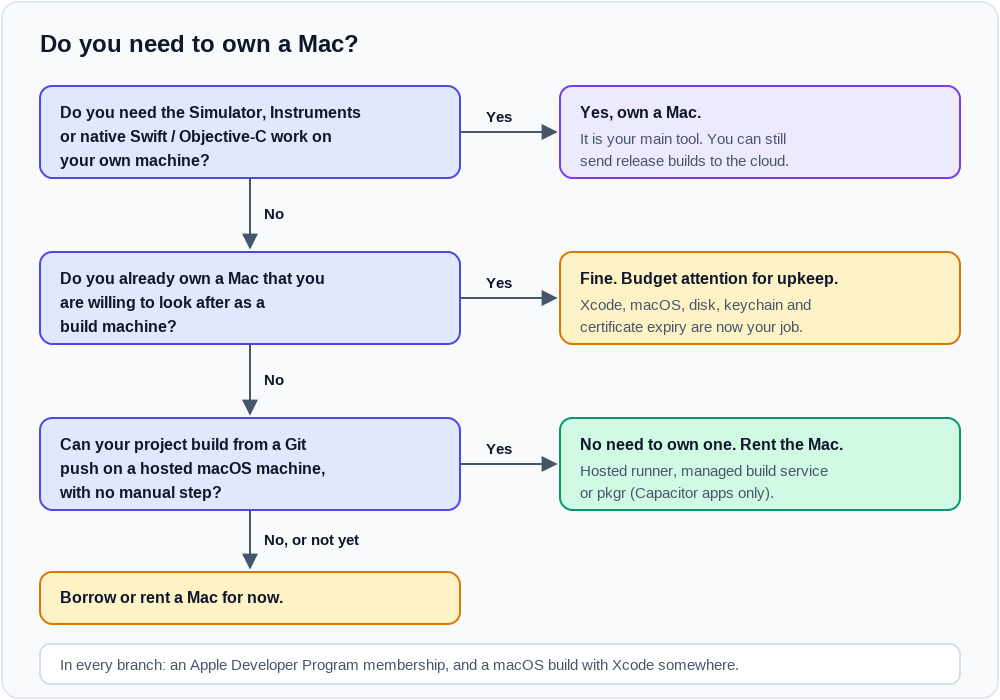
The tree is deliberately plain. If neither of the first two answers applies and your project can build from a Git push, you are in the group that never needed to buy a machine. If it cannot build in the cloud yet, borrowing or renting a Mac for a while is a respectable answer.
What pkgr removes, and what it does not
Vague claims are what I distrust most in this category, so here is what the repository says.
pkgr installs a GitHub Actions workflow in your repository. For iOS, that workflow runs on GitHub’s hosted macOS runner (the label is macos-latest). So the Mac exists. It belongs to GitHub, it is created fresh for the job, and it is thrown away afterwards. The workflow fetches your certificate and profile at run time with a short-lived token, creates a temporary keychain on that runner, builds and archives the app with xcodebuild, exports an IPA, and deletes the keychain at the end. The upload to App Store Connect is a separate workflow that calls Apple’s altool on a macOS runner, because that tool comes with Xcode and my own backend runs on Linux.
What disappears for you is the part that used to land on your plate. You do not install or update Xcode. You do not create a keychain by hand or find out it is locked. The distribution certificate is generated through the App Store Connect API from a wizard, and the provisioning profile is created the same way, so Keychain Access never opens. The build number comes from the run counter. The App Store listing, the export-compliance answer and the submission for review are driven through Apple’s API too.
One signing decision started in a planning document, IOS_SIGNING_ENVIRONMENTS_PLAN.md. I wrote it as a draft and flagged my own assumption as needing verification against a real Apple account: one distribution certificate can sign both an Ad Hoc and an App Store export, and only the provisioning profile and export method differ. The workflow now follows that design. Staging exports Ad Hoc, production exports for the App Store, with the same certificate. The plan file itself still says “draft, not implemented”, which is out of date. The code moved on and the document did not.
Now the limits, which matter more than the features.
First, pkgr does not remove the Apple account. You need a Developer Program membership and an App Store Connect API key, and you remain the owner of both.
Second, it supports Capacitor projects. The workflow is built around the ios/App/App.xcworkspace layout that Capacitor generates, and the readiness check looks for ios/App/Podfile. A native Swift app, or a stack I have not built for, is not a fit today.
Third, simulator testing still needs a Mac. pkgr can give you a staging build that you install on a real device through an Ad Hoc profile, and that profile lists specific devices, so it installs only on those. To step through code in the iOS Simulator, you need a Mac.
Fourth, the builds run in your repository on your GitHub account’s Actions minutes. In the product spec I listed two risks I cannot control: macOS minutes cost more than Linux ones, and GitHub’s macOS queues vary. When a build waits in “queued”, that is GitHub’s capacity, not mine. I also do not pin the Xcode version. The workflow uses whatever image macos-latest points to, which is convenient until the day it is not.
Fifth, certificates and profiles still expire. pkgr shows the expiry date and can regenerate both through the wizard, but it does not renew them for you. The spec lists silent expiry as a known risk that I accepted for the first version: you get an error when the build runs, not a warning before.
So the honest summary is not “no maintenance”. The maintenance that remains is small, visible and attached to your Apple account rather than to a machine.
Where I land
My answer to the student on the Windows laptop is this. You do not need to buy a Mac. You need to decide who runs the one that builds your app, and to know what you are handing over. If you hand it to a hosted runner, you own the scripts. If you hand it to a managed service, you own a dependency. If you keep it on your desk, you own the loop.
Any of those can be right. The wrong choice is the one made by accident, where a Mac ends up in your workflow and nobody decided who is responsible for it.
If your app is a Capacitor project and you want the shortest path from a Git push to TestFlight, you can try pkgr at pkgr.app/early-access. The founder offer is open to the first 100 people: USD 149, paid once, for lifetime access to the Starter plan. Usage limits still apply. After the 100 spots, Starter becomes a monthly plan at USD 9 per month at the time of writing. If no build has been made by December 31, 2026, you get a full automatic refund.
Keep reading
If you want to see the signing layer without any tooling beyond openssl, I wrote how to generate an iOS distribution certificate without a Mac. And if you are curious about what broke while I automated all of this, what I learned automating iOS code signing is the longer story.